Code Snippet Scope
Code snippets can be scoped on three levels (in order of the priority):
Project
Language
Global
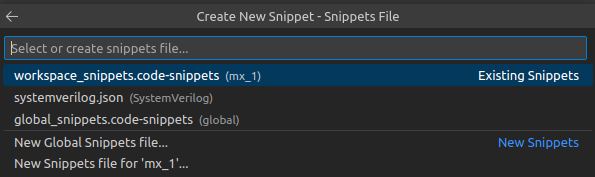
Tip
In the Existing Code Snippets section you can see the snippets sorted by their priority together with their scope between the brackets.
Project Scope
The files are located in the root of the project inside the .vscode folder and must have the .code-snippets suffix.
Project code snippet files are useful for sharing code snippets among team members working on the same project.
Language Scope
These code snippets are defined in a specific language’s code snippet file (for example systemverilog.json or vhdl.json). These code snippets are available only when editing a file that has the specified language.
The language code snippets are serialized in the user data directory.
Global Scope
These code snippets are also serialized in the user data directory and must have the .code-snippets suffix. The global code snippets are available in all editors, regardless of the language.
Note
Code snippets saved in the user data directory are, by default, located at $HOME/.config/Code/User/snippets.
Tip
In a code snippets file located at the project or global level, you can include an additional scope property that accepts one or more language identifiers. This makes the code snippet available only in editors using the specified languages.
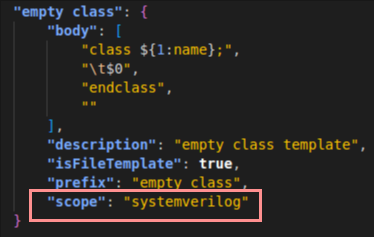
To learn more about the other properties, see the Create your own snippets chapter from the VS Code documentation.